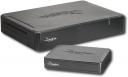
Review: Rocketfish’s Universal Wireless Rear Speaker Kit

Tue, Jun 12, 2007

Audio Server, Reviews

rocketfish_wireless.jpgHome theater surround sound systems are a great way to enhance watching movies and television at home. The only drawback to such a system is the mess of wires connecting the rear speakers to the AV receiver. For the hardcore audiophile, this means fishing wires through existing walls. Not everyone can be so adventurous though.

Rocketfish, Best Buy’s internal brand, offers a unique solution to eliminate wires in your living room or den: the Universal Wireless Rear Speaker Kit (which sells for $99 at Best Buy). From Rocketfish’s website:

With the new Rocketfish Universal Wireless Rear Speaker Kit and your “home theater in a box” or component home theater system, you can enjoy full, enveloping surround sound with fewer wires. This affordable system lets you wirelessly connect almost any rear-surround speakers to any home theater receiver, allowing you to place your speakers for optimal surround performance while maintaining a clean, organized appearance.

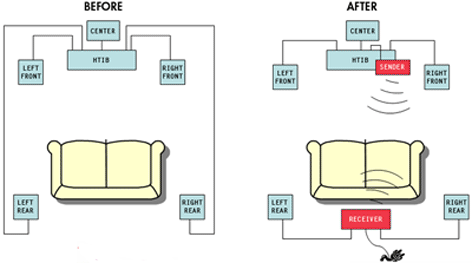
The kit comes with a small wireless transmitter unit that connects to the AV receiver rear speaker outputs, and a larger black box that houses the wireless receiver and amplifier. The receiver must be plugged into a wall outlet for power. The picture below provides an illustration of the advantage of the wireless speaker kit.
rfish_beforeafter_0407.gif
The wireless speaker kit is a great idea for apartments or situtations where you cannot run wires through the walls. Several months ago I went to a Superbowl party at a friend’s apartment who had a surround sound system not set-up because the wires would have to run across two door openings. His plasma TV was definitely lonely.
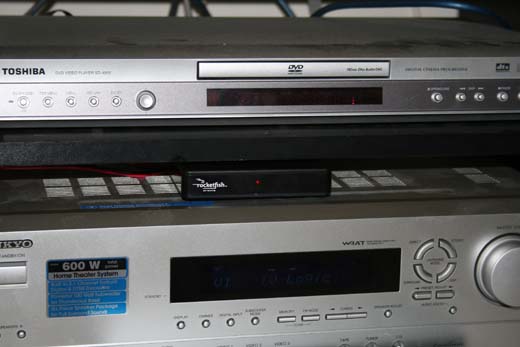
With the Wireless Speaker kit in hand I went over to his apartment last week. We set-up the system in about 10 minutes. The receiver and the transmitter are linked at the factory so there is almost no set-up required. Connect the speakers to the wireless units and turn on your surround sound receiver. That’s about it. Below is a picture of the wireless transmitter.
rocketfish.jpg

The wireless speaker kit does have some limitations, espcially since it is not entirely wireless. Both rear speakers connect to the wireless receiver, which also must be plugged into a power outlet. This means there are still three wires running in the back of a room.

The set-up I tested had the couch almost against the back wall, which offered a place to hide the receiver and the speaker wires. The kit may not work as well in larger rooms in which a couch is not against a wall. In some ways, the system would be better if the rear speaker receiver was split in two, one for each speaker.

One thing to keep in mind is the latency delay between the rear speakers and the front speakers. Since the rear speakers are connected wirelessly, there may be a slight delay. Although we did not experience any noticeable delay, most surround sound receivers should be able to compensate with the right settings.

Overall, the Universal Wireless Speaker Kit is a very convenient and practical product that eliminates cable clutter with a very little downside. The Universal Wireless Speaker Kit is something both you and your significant other can enjoy. During our set-up we were joking that the kit could save a lot of marriages.

For a price of $99, the kit is relatively cheap. In the right situation, this product is almost a no-brainer, especially in apartments. My friend was very excited to have surround sound after almost a year of not having it.

del.icio.us | Digg it | reddit | StumbleUpon |

Enjoyed the post? Subscribe to the full feed for daily updates.

Related Posts on Floppyhead.com:

  • Floppyhead Turns One Year Old
  • Eos Wireless Ipod Speakers | Digital Audio for the Whole House
  • Universal to Sell DRM-free Music Everywhere Except iTunes Music Store
  • Inteset Adds Quad CableCard Support to Denzel Server
  • This post was written by:

    Kevin - who has written 162 posts on Floppyhead - Digital Media and Home Theater Computers.


    Contact the author

    14 Comments For This Post

    1. Larry Says:

      This system has a lot going for it. But I don’t need it for a surround system. Got that. Now I’m trying to get music into the other rooms of the house without pulling wires and drilling through joists. I’d like just one central system to run the music. What I want to know is if I could get two receivers to work with the transmitter. Or three. The reviews indicate that this is a digital uncompressed signal. The question is whether there is any “handshaking” going on. In other words, does the receiver transmit back to the transmitter a message that it is working? If so, then adding more receivers won’t work. If not, I don’t see a problem with adding more receivers. The cost is low enough that I’m willing to stick the extra transmitters in a box as a backup in case of failure. Anybody out there know?

    2. Tom Says:

      I was a bit apprehensive about this product. I have tried a few others in the past and they have never worked properly. There was always an
      interference factor.

      I purchased the Rocketfish Wireless speaker kit figuring that it wouldn’t work, like all the others. To my surprise, it works. It not only works, but it works great. There is no interference with other 2.4Ghz items in my house (although, i cannot use my laptop wirelessly when the unit is on. I guess i’ll have to listen and watch movies instead of doing internet).

      Bravo Rocketfish on an awesome product. You have solved my problem.

    3. DC Says:

      Not sure I get the last message from Tom. If the system runs on a dedicate frequency, I’m not sure how the wireless from his laptop would run interference. If in fact this is a problem with wireless internet, and the Rocketfish system, what are the chances of other wireless internets in the area interupting the signal? Other then this issue, it’s about time someone came up with a great system. If Tom is happy with it, I’m sure I would be too.

    4. Jack Says:

      How is the sound transmited to the back speakers? Is it RF, infra red or something else. I have a wireless weather station and I am a ham radio oprator so I sure don’t want interference to these devices. Thanks for your answer. Jack

    5. Don Says:

      As soon as you plug the provided speaker unit wire in to the sender unit the unit powers off. Scan of Best Buy showed people with the same problem. Maybe if you had a low-end surround system they would work. Wasted a lot of time before returning product.

    6. Tamara Says:

      The set up was easy but my units didn’t sync up right away. I was, however, very disappointed in the speaker wire length that was provided for the rear speaker connection. Even with it going behind my couch, I have to have the unit on top of my couch and the speakers also on my couch until I can run out and get longer speaker wire. I don’t have an overly long couch so I didn’t understand why the wires were so short. I took my time in picking out my home theater system and did the same with the wireless rear speaker kit. Had I known the wires were that short, which it doesn’t list on the box, I would have purchased extra wire so that I could have had my system set and not have to run out and get additional wire once I had the entire system set up.

    7. Robert Allyn Says:

      Does this wireless system work with a Bose home theater unit?

    8. Kevin Says:

      Robert:

      It should. I see no reason why not. It is device independent.

    9. Andy Says:

      I purchased the wireless unit and love it. I run it to a pair of bose rear surround speakers, and it works great. I do have a question though, can it be used for speakers other than rear surround? Meaning, I would like to run a pair of spekers in my master bathroom. Can this unit provide enough horsepower to drive a small set of bookshelf speakers adequately? tx and love the product.

    10. jy Says:

      anyone tried this speaker system work with Sonos? we’re looking to get a Sonos system but would like wireless speakers to go w/it.

    11. Bill Says:

      I use the Rocketfish to connect my outdoor speakers to my home stereo. It worked flawlessly. But since I hooked it up it is the dead of winter and I now have an I-Mac and an airport Express so my I-Tunes hooks up wirelessly to the home stereo. Will both wireless systems work together?

      Also, don’t leave your Rocketfish outdoors on a hot day in the sun like I did, the cabinet is really warped but it still works.

      Funny, the kid at Best Buy didn’t think it would work for this application, “It only works for Surround Sound” he noted. They are missing an equally large application, and it would be nice if they had an outdoor waterproof/sunproof version.

      I Highly recommend it!!!

    12. Will Joyner Says:

      “To my surprise, it works. It not only works, but it works great. There is no interference with other 2.4Ghz items in my house (although, i cannot use my laptop wirelessly when the unit is on. I guess i’ll have to listen and watch movies instead of doing internet).”

      You say there is no interference yet you cannot use your laptop wirelessly when the unit is on? That sounds like the very definition of interference to me. I just bought this unit and as it turns out I have the same problem. When the unit is on it interferes with my wireles signal to the point where wireless internet is unusable. For me this is a major problem since I don’t even have a wired connection in my house, I run my laptop 100% of of a wireless connection regardless of where it is in the house.

    13. carol Says:

      I just got this issue with my system it went quiet - out of the blue with the tv, it works fine with radio and cd, while whiching tv it went out. any ideas?

    14. Ed Says:

      I was not expecting much out of this system being a wireless add on. It took me about 15 minutes to setup and that included moving furniture. Other them having to cut my speaker wires becuse they have propitary plugs on them I am in love with this system. Price and sound quality are phenominal. I would suggest this to anyone and have. Thanks for a great product that lives up to the hype.

    2 Trackbacks For This Post

    1. Floppyhead reveiws the RF-WHTIB. Sees the value. « Alive Matters Says:

      [...] Posted by mtc on July 26th, 2007 Not sure who Floppyhead are, but they wrote a pretty good review of the Rocketfish RF-WHTIB. They write with a bit more professionalism, if not a bit less transparency.  Who are they… why do they care so much about HTPCs and getting advertising revenue?  Anyways… [...]

    2. PreGameLobby - New Home = New HT -- Please Help! Says:

      [...] can’t really agree with not running rears. Try these if its just the speaker wire thats stopping ya Review: Rocketfish’s Universal Wireless Rear Speaker Kit ? Floppyhead - Digital Media and Home Theater Computers [...]

    Leave a Reply