ad space

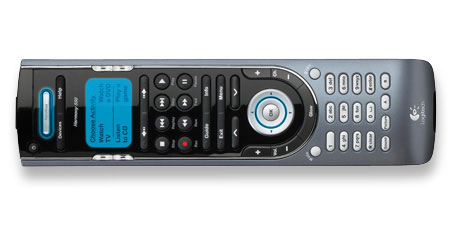
I recently purchased a Logitech Harmony 550 remote for about $80 from Amazon.com (note: the Logitech website says it retails for $125 but it can be found for much less online). I had heard about Harmony remotes the last couple of years but always thought they were expensive. After reading a post at Zatznotfunny.com, I decided to make the leap and buy the low end of the Harmony line, the Harmony 550.

From the Logitech website:

  • Simple, one-touch activity control. Choose the “Watch a DVD” activity and the Harmony universal remote will power on your TV, DVD player, stereo receiver, set all the inputs, and even press “Play!”
  • 4 customized media buttons: Two cable “A” and “B” buttons, plus “Sound” and “Picture” convenience buttons help you change picture aspect ratios and sound modes.
  • Access the world’s largest A/V Control Database–updated daily! Logitech’s on-line database includes over 3,000 manufacturers and over 100,000 IR devices–everything from HDTV´s to PVR/DVR´s, from laserdiscs to VCRs–even lighting controls and more!
  • Replace up to 15 remote control devices.
  • Interactive LCD display and fully backlit keypad make it easy to navigate and manage your media in the dark.

Overall, I am very pleased with the Harmony 550 and would highly recommend it to anyone looking for a universal remote. It integrated my cable box , TV, and DVD player into one remote using an easy, online database. The build quality is nice and the remote feels solid. It looks great too, especially with the backlit buttons.

I do have the following complaints about the remote though:

  • The number pad is too small for my fingers. I have to use my fingernails to use the number pad to change channels.
  • The main power button should turn on the TV and cable box. Right now I have to select Watch TV from the LCD.
  • The fast forward for the DVR moves almost at warp speed, blowing by scenes. Hard to explain but almost twice as fast as the fastest setting on the cable box remote.
12256.jpg

del.icio.us | Digg it | reddit | StumbleUpon |

Enjoyed the post? Subscribe to the full feed for daily updates.

Related Posts on Floppyhead.com:

  • IPod Tuneview remote wirelessly controls music with LCD screen
  • Logitech’s Wireless DJ Music System: Is my search over?
  • Universal to Sell DRM-free Music Everywhere Except iTunes Music Store
  • Floppyhead Turns One Year Old
  • 4 Responses to “Review: Logitech Harmony 550 Universal Remote”

    1. on 23 Mar 2007 at 8:17 pm illuminati

      Screw Harmony, the iconRemote Rocks!

      My mom isn’t exactly what I would call technologically gifted (she still needs me to help check her email.) So, when I set out to find a universal remote for her, I wanted something SIMPLE that could handle a few devices. She doesn’t have much of a home theater system, but what she does have is pretty basic – TV, DVD player, and stereo. After a few hours of research on the internet, I finally settled on the Logitech Harmony 550 Universal Remote. Big mistake!

      I picked it up at the store and I had to bring my laptop to her place so that I could program all the codes in. It was a little annoying to have to hook it up to the computer, because I kept imagining her changing the batteries and me having to go through the whole process again. Then, right after I finished the set up, she was skeptical because the buttons are so freaking small. Her nails are long and she kept hitting two buttons at once. Plus, although she can read the newspaper fine, she had troubles with the printing on the buttons, because most of them blend into the remote casing.

      That wasn’t the only “vision” problem, either. The reason I bought the Harmony is that I liked the idea of macros. It has functions like “Watch TV” and “Watch a DVD” that I thought would make things easier for her. Boy, was I wrong. The buttons worked, but it was hard for her to see the labels, because the LCD screen is pure crap! Logitech has done the same thing that every manufacturer does and made an LCD screen where the black lettering barely stands out from the blue background. I can barely see the thing myself.

      So, I tried to teach her how to operate the thing, but she just kept making those subtle “mom” comments like, “I really appreciate it, but I just wish the buttons were bigger” and “Which button do I push to play a DVD again?” I took the hint and told her I would find something else.

      Back to the drawing board. The next day I got an email from X10.com that said that they were testing a new remote called the iconRemote. It looked like it would work, so I decided to give it a try. They were only releasing 100 to customers, but I was one of the lucky few. (I had my mom sign up too, so we could both get one.) It does a lot of what the Harmony does, only much better. It solved all my mom’s problems and has some awesome features that we didn’t even know we wanted.

      The major issue was solved – my mom can actually see this remote! Call me crazy, but that seems kind of important to me. The iconremote is laid out much better and the buttons are big and easy to see. Plus, the LCD screen is full color, which solved the visibility issue there, too. And, when I say full color, I mean FULL color. It’s like a mini plasma screen!

      After I set it to control the TV, DVD player, and Stereo in the living room, I still had plenty of room for my mom’s kitchen and bedroom televisions. She loves this remote so much that she carries it with her all over the house. Plus, the iconRemote has a bunch of other cool features, too . . .

      Like the Harmony, the iconRemote has an easy to follow set up Wizard, but the iconRemote never needs to be hooked to a computer. It has every code built in. I even had my mom set it up and she had no problem at all. So, when she changes the batteries, I won’t have to come running back to her place so that she can watch her soap-operas.

      Also like the Harmony, the iconRemote has macros, but the iconRemote lets you program them to do whatever you want them to. You’re not limited to 4 preprogrammed macros like “Watch DVD”. I have set up all sorts of different functions for her, which means I don’t get nearly as many “tech-support” phone calls as I used to.

      Here is the big difference: It has a feature that lets you pick all of your favorite channels and display their logos (NBC, ESPN, etc.) on the LCD screen. When you want to change channels, you push a button next to the screen and then the channel jumps to whatever logo you pressed. I don’t have to skip through the crappy channels anymore, unless I want to. I programmed all of my mom’s favorites into her remote and she skips from Oxygen to Lifetime to whatever she wants with the corresponding button. I have mine set up for my favorites, and I even have profiles set up for my wife, a kid-safe one set up for our son, and one set up for the babysitter. You can set up to 10 custom profiles, including a HIS and a HERS button right above the display. It’s like a “his and hers remote”!

      The iconRemote blows the Harmony out of the water, or, rather, out of the living room! It is easier to set up, to see, and to use. Sorry, Logitech, but next time, maybe you should put some actual thought into your design process like X10 did.

      The iconRemote isn’t for sale to the public yet, but there is an email list for updates and info at: http://www.X10iconRemote.com . It looks like it will be on sale soon.

      There is also a Knowledge Base at:
      http://kbase.x10.com/wiki/IconRemote

    2. on 04 Apr 2007 at 12:09 am Kyle Rayner

      Thank you, Illuminati, for your dissertation on the iconRemote. I checked out the link, and it looks promising. I like the fact that iconremote doesn’t need to be hooked up to a computer in order to get it setup. That alone is why I tend to shy away from the Logitech remotes. I’m still on the market for a new remote (the remote to my DVD player broke, and I can’t do anything without it) and I will be giving the iconremote some serious consideration. The $120 price tag looks enticing as well.

    3. on 16 Apr 2007 at 8:14 pm Kyle Rayner

      Just thought I’d give you a heads up– I just got my iconRemote in the mail. I remembered that you (really) liked this remote. I can see why. So far, I haven’t had any problems with it. It sets up quickly– in figured out the codes to all my stuff the first time around. I haven’t setup a lot of the features, other than Punchthrough and Favorites, but so far, I have no complaints. It was well worth my $130.

    4. on 04 Dec 2007 at 10:10 pm Kenny

      Just letting you guys know the X10 is actually the Philips SRU8010, which you can find for $65 online.

    Trackback URI | Comments RSS

    Leave a Reply